


Table of Contents
Explore top cold outreach platforms in 2026. Compare tools, features, and AI strategies to improve deliverability and get more replies.
Getting a reply from cold outreach depends on your tools. You need AI that personalizes, reliable delivery, and a way to reach people across channels. The average reply rate is 3.43%, so your platform choice makes a big difference. See cold email response rates.
A single, unified system is the fastest way to scale. Fragmented tools create friction and slow you down. BrandJet combines outreach, AI signals, and automation into one platform. Learn about multichannel outreach.
Here are the tools that actually work. If you want one system that combines outreach + brand monitoring, try BrandJet.
Cold Outreach Platform Quick Wins
Here is a quick summary of what actually drives results across today’s top cold outreach platforms. Follow cold email best practices.
- Strong deliverability drives results. Email warmup, inbox rotation, and domain reputation matter more than clever email templates. Read email warmup guide.
- Multichannel outreach performs better. Combining email, LinkedIn, and social touchpoints increases replies and builds trust faster. See multichannel strategy.
- A unified platform saves time. Managing outreach, automation, and signals in one system reduces friction and speeds up execution. Explore automation tools.
Top Cold Outreach Platforms Today
They have the same sales pages. The same promises. You’ve seen them. “Send 1000 emails a day!” The problem isn’t sending.
It’s everything that happens next. Does the email vanish? Do you get a reply? Can you send more tomorrow, or are you blocked? The right software handles those parts. Avoid issues with why emails go to spam.
According to the Innovation in Aging (Oxford University Press),
“The enrollment rate was 23.88% for participants recruited via the ‘trusted messenger’ method and 1.18% for those recruited from the ‘cold calls’ method.” – Innovation in Aging
Forget Templates. Check These Things.
Open the features list. Ignore the word “AI” for a minute. Look for this instead.
- Email warmup. This is not optional. A real platform will slowly send emails from a new address to build a good reputation. If it lets you send full volume immediately, it’s setting you up to fail. Learn email warmup.
- Inbox rotation. Sending from one address all day gets it flagged. The tool should automatically switch between several of your email accounts.
- LinkedIn and social hooks. Email is noisy. Adding a LinkedIn message a few days later works better. Your software should do both in one sequence. See LinkedIn outreach.
- Real personalization. “Hi {First Name}” is basic. Can it say, “I saw your team’s post about [Industry Trend]” based on a LinkedIn profile? Learn personalization.
- CRM sync. Replies and opens should appear in your Salesforce or HubSpot automatically. No manual work.
- Workflow logic. You need to build rules. Example: “If they open email 1 but don’t reply, add them to a LinkedIn sequence.”
Teams spend weeks on email copy. It’s the wrong focus. A boring email that lands in the primary inbox beats a clever one in spam. Deliverability features matter more than writing. Improve this with deliverability checklist.
| Where People Waste Time | What Actually Gets Replies |
| Writing the “perfect” cold email | Making sure 90% of emails avoid the spam folder |
| Buying expensive contact lists | Personalizing the first line with specific company info |
| Using a single sending domain | Rotating through 3-5 separate domains and addresses |
💡Pro Tip: Most teams overfocus on email templates. In reality, deliverability features (like email warmup and inbox placement test) have a bigger impact on replies. See inbox placement.
Top Email Outreach Platforms For B2B
Pick an outreach tool based on your biggest headache. The market splits because each tool fixes a different problem.
Here’s the lineup.
Need to send a ton of emails? Use Instantly.ai.
It’s built for volume. You get unlimited accounts and tools to keep your emails landing. The automation works without much fuss. It’s an email machine, period. Add other apps for LinkedIn or social.
Want emails that look custom? Try Lemlist.
Lemlist made its name on creative touches. You can add images with personalized data, or build mini landing pages. It helps you stand out in a crowded inbox. Scaling this across every channel isn’t its strong suit.
Is deliverability your fight? Smartlead focuses there.
This tool is technical. It rotates between inboxes to avoid spam filters and guards your sending reputation. Agencies use it to manage dozens of domains without getting blocked.
BrandJet AI does two jobs: outreach and listening.
Other tools just blast messages. We built BrandJet to listen first. It watches for mentions of your brand across the web, scores the context, and uses that to decide who to contact and when.
It sends sequences via email, LinkedIn, and WhatsApp, and includes AI helpers for writing. You can test this approach directly with BrandJet.
Best Cold Outreach Software
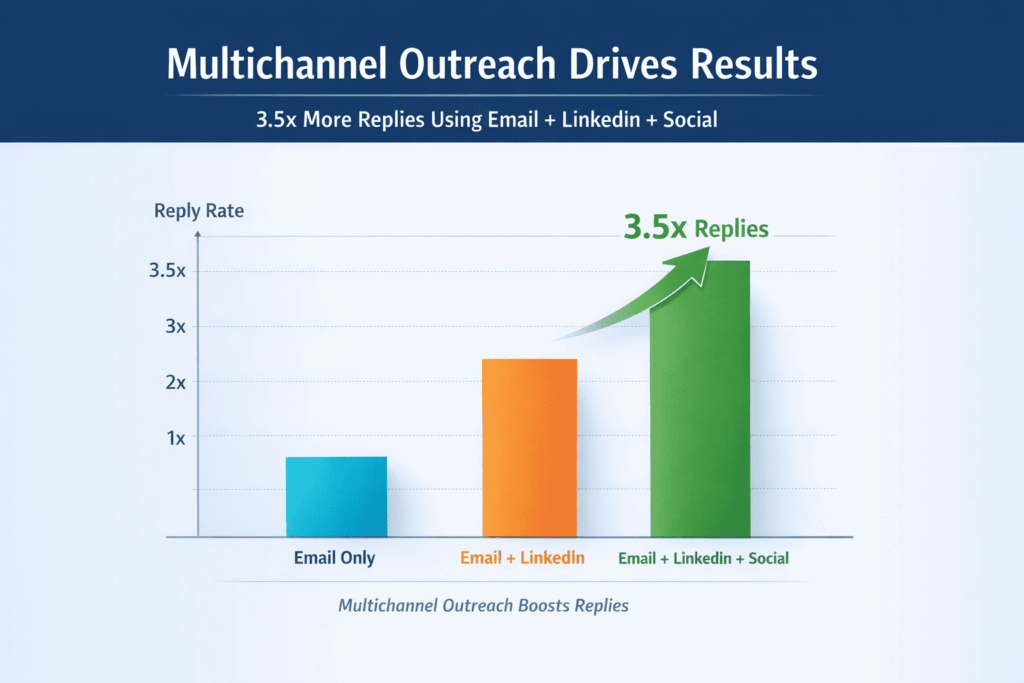
Stop sending one email and hoping. It doesn’t work. Numbers from real campaigns show a harsh truth: using email, LinkedIn, and social together gets up to 3.5x more replies than email alone. Learn from multichannel data.
If you get 5 replies now, you could get 17. That’s not a small tweak—it’s a different result entirely.
One message feels like spam. Three feels like a conversation.
Nobody trusts a single cold email. Would you? But what happens when that same person connects on LinkedIn the next day? And then comments on your company’s tweet a day later? You notice them. They’re not random senders anymore.
They’re someone who’s appeared a few times, in a few different places. That pattern builds just enough familiarity to make hitting “reply” feel safe.
Here’s how it works in practice:
- Email: Your first, direct ask.
- LinkedIn: Proof you’re a real person with a real job.
- Social Media: A casual, non-salesy interaction.
Blasting someone on three channels with the same generic pitch is just annoying. The goal is relevance. What if your first contact happened at the perfect moment? See personalization.
These free tools serve a purpose. They’re useful for testing your outreach message, running a small project, or when a startup has no budget. Start with cold email basics.
The trend is clear: tools are getting better at doing the boring work for you. The goal is to spend less time building sequences and more time talking to leads. Read automation trends.
Picking your sales software is really about picking how your sales cycle will work. See sales cycle guide.
Teams shopping for a new tool are trying to fix problems. They want more replies from prospects. They need their emails to land reliably. They want to set up their outreach faster. And they need a practical plan to do it. Follow outreach strategy.
Doing this by hand will burn you out.
Switching between your inbox, LinkedIn, and Twitter for every single prospect is unsustainable. You’ll lose track. That’s why these platforms were built.
| Tool | Manages These Channels | If You Need This |
| Lemlist | Email + LinkedIn | To personalize emails deeply and automate LinkedIn steps. |
| Reply.io | Email + Calls + WhatsApp | To add phone calls and texts to your email sequences. |
| La Growth Machine | Email + X/Twitter + LinkedIn | To find and talk to prospects on social media. |
Blasting someone on three channels with the same generic pitch is just annoying. The goal is relevance. What if your first contact happened at the perfect moment?
BrandJet tries to solve this. It watches for public signals—like when a company gets press, posts a job, or shares a win—and can start your outreach based on that trigger.
Your email arrives referencing something that just happened to them. It’s not a cold pitch anymore. It’s a timely observation. That’s what gets a reply.
💡Pro Tip: The best-performing campaigns often start with LinkedIn engagement before sending email sequences. It warms up both the prospect and your domain.
Free Cold Email Outreach Tools
Paying for software isn’t mandatory at the start. Some free tools work fine for basic outreach.
GMass vs. Snov.io vs. Apollo
A quick comparison of three common free options:
| Tool | Key Function | Main Limitation |
| GMass | Bulk email campaigns from Gmail. | Gmail-centric; limited analytics. |
| Snov.io | Email verification and short sequences. | Low daily send limits on free tier. |
| Apollo | Lead database and CRM sync. | Free lead list access is restricted. |
These free tools serve a purpose. They’re useful for testing your outreach message, running a small project, or when a startup has no budget.
The catch is scaling. Features for improving email deliverability are weak, and automation hits a ceiling fast.
Best Cold Outreach Tools For Startups
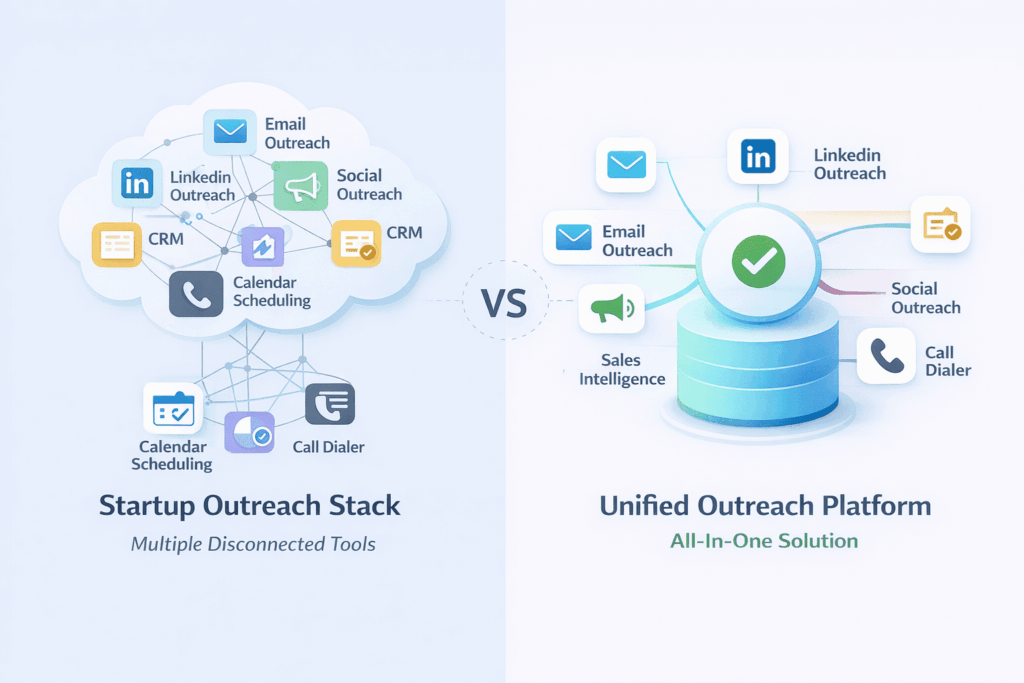
Let’s be honest, most outreach software is too complicated. Startups don’t need that. You need something simple that works, won’t break the bank, and your salesperson can figure out in an hour.
Forget Features, Focus on This
Ignore the long list of capabilities. Ask about these four things instead:
- How fast can we use it?
- Does it handle email warmups for us?
- Can we build a sequence in ten minutes?
- Will it connect to our CRM?
Your Two Options
You’re going to choose between building a stack or buying one platform.
| The DIY Stack | The All-in-One |
| Pick the best tool for each job. Instantly to send Apollo for leads. | Use something like BrandJet. It does sending, sequences, and tracking. |
| Upside: You get the specialist. | Upside: One login. One place for all your data. |
| Downside: Three bills, three logins, data never talks. | Downside: Might not have every hyper-specific feature. |
Using one platform is simpler. You don’t need five tools running to send one campaign. Everything lives in the same spot, from writing the email to seeing who replied.
What You Absolutely Need
Don’t compromise here.
- Automated follow-ups.
- It stops emailing someone when they reply.
- Basic reports on opens and clicks.
Figuring Out the Cost
It’s more than the monthly fee.
- Use the free trial. Is the interface confusing?
- Check the pricing. Is it per user, or per thousand emails?
- Remember the other costs. Your lead database (like Apollo) is separate. Your CRM is separate.
According to the Proceedings of the National Academy of Sciences (PNAS),
“For every $1 spent on outreach, $50 – $8,000 in benefits were claimed/disbursed.” – PNAS
Common Mistakes
These will sink your campaign.
- Not warming up your email address first. This is how you get marked as spam.
- Using a crappy, old contact list.
- Sending the same robotic template to everyone.
Keep It Simple
The right tool is the one people on your team will actually log into. It makes sending emails easier, not harder. It protects your ability to get to the inbox. For a lot of startups, that means choosing a single tool that does the important things right, so you can focus on your.
Top Lemlist Alternatives 2026
Lemlist is powerful for personalized outreach, but what if you don’t need all the flashy visuals?
You might prioritize something else, like making sure emails actually get delivered, finding a simpler tool, or setting up deeper automation.
Your best alternative depends on what you’re trying to do.
Find A Simpler Tool
For small teams that want to move quickly. Saleshandy is known for being easier to get started with. Its setup is less complex, so you can spend less time learning the software and more time running campaigns.
Ensure Emails Get Delivered
If your main worry is hitting the inbox, especially at scale. Smartlead concentrates on inbox rotation and protecting your sending reputation. It’s built for high-volume senders where deliverability can’t be an afterthought.
Replace Multiple Tools
To consolidate your tech stack into one system. BrandJet isn’t just an email tool. It bundles multichannel outreach, AI personalization, and brand monitoring together, aiming to be the only platform you need.
These options look beyond just writing better emails. They focus on fixing the entire outreach process.
Top Instantly Alternatives 2026
Choosing an email automation tool isn’t about features. It’s about what you want to accomplish.
Instantly sends emails. It does that well, at a large scale. But it’s just an email. For teams that also use LinkedIn, or need to know why a prospect might be interested now, it’s not enough.
Other platforms solve different problems. They change how you think about outreach. You stop asking “how many emails can I send?” and start asking “what should I say, and when?”
Reply.io connects channels. You build a sequence that starts with an email. If there’s no reply, it automatically sends a LinkedIn message a few days later. It can add an SMS, too. The conversation moves with the prospect, across platforms, without you managing each step.
Smartlead protects your sender reputation. It gives you graphs showing exactly how many of your emails landed in the inbox versus the spam folder. You can slowly ramp up new email accounts to avoid getting blocked. It’s built for people who are serious about long-term deliverability.
BrandJet finds reasons to reach out. It monitors companies for events—like a new executive hire or a product announcement.
It then flags those companies and suggests who to contact. The AI can even draft a message referencing that specific news. Your outreach feels relevant, not random.
The real difference is context. A simple tool provides a contact list and a “send” button. An advanced platform provides a reason to send. That reason—the recent news, the job change, the project launch—is what gets your email opened.
Which Tool Should You Use?
| Tool | What It Does Best | Its Main Drawback |
| Instantly | Launching massive email campaigns fast. | No multi-channel support, no intelligence. |
| Reply.io | Automating a follow-up path across email, LinkedIn, and SMS. | Setup is more involved than a simple email blaster. |
| Smartlead | Keeping your emails out of the spam folder. | It’s mostly for email, not other channels. |
| BrandJet | Turning live company data into timely outreach. | It’s newer, with fewer proven case studies. |
So, pick your tool based on your goal. If you need to contact ten thousand people with one message, use a volume sender.
💡Pro Tip: Scaling emails without improving targeting often lowers reply rates. Tools with AI optimization and signal-based outreach perform better over time.
Top Reply.io Alternatives
It’s built for big, multi-channel campaigns. For a small team or a solo founder, that power often comes with a steep learning curve.
The dashboard is packed with features, and setting up your first sequence can take an afternoon. People are moving toward tools that feel simpler, even if they do a bit less.
Lemlist: Simple Personalization
Lemlist is for cold email. Its main job is to make emails not look like spam. You can add custom images—like a prospect’s company logo—directly into the message body.
It connects to LinkedIn to grab profiles easily. You don’t need a manual to start using it, which is the main point.
La Growth Machine Connects Your Channels
This tool is for running the same campaign on different platforms. You create one sequence that sends an email, then a LinkedIn invite, then maybe a Twitter DM.
It’s less about making each message perfect and more about making sure the campaign runs on autopilot everywhere.
| If you need… | Try this… |
| Easy, visual email personalization | Lemlist |
| A campaign that runs on email, LinkedIn, and Twitter automatically | La Growth Machine |
| One inbox for all replies, plus an AI helper | BrandJet |
BrandJet: The Combined Inbox
BrandJet puts all your replies in one place. Messages from email, LinkedIn comments, Instagram DMs—they all go into a single shared inbox for your team.
Its AI helps by drafting reply suggestions and telling you which leads are most likely to respond. It’s for closing tabs, not opening more.
“We switched because we were tired of checking six different apps every morning.”
How to Choose
Ignore the feature list. Ask what slows you down.
- Is writing each unique email taking forever? Use Lemlist.
- Is copying leads from social media to your email tool a daily chore? Use La Growth Machine.
- Are replies getting lost between apps? Try BrandJet.
The trend is clear: tools are getting better at doing the boring work for you. The goal is to spend less time building sequences and more time talking to leads.
BrandJet AI vs Lemlist Comparison
Both platforms support multichannel outreach, but they approach it differently.
| Feature | Lemlist | BrandJet AI |
| Personalization | Visual + dynamic content | AI-powered sequences + sentiment |
| Channels | Email + LinkedIn | Email + LinkedIn + WhatsApp + social |
| Deliverability | Solid | Built-in deliverability stack |
| AI Features | Limited | AI Writer + AI Sequence Copilot |
| Unique Edge | Creative outreach | Brand intelligence + real-time signals |
Lemlist helps you stand out visually. BrandJet helps you decide when and why to reach out.
BrandJet AI vs Instantly Comparison
Instantly is optimized for sending volume. BrandJet focuses on timing and context.
| Feature | Instantly | BrandJet AI |
| Sending Volume | Very high | High with control |
| Warmup | Unlimited | Dedicated (no shared pools) |
| Channels | Email only | Multichannel outreach |
| AI Personalization | Basic | Advanced AI-powered sequences |
| Workflow | Sending-focused | Full outreach system |
If Instantly is a sending engine, BrandJet is closer to a full outreach control center.
BrandJet AI vs Reply.io Comparison
Reply.io is built for multichannel execution. BrandJet adds intelligence on top of execution.
| Feature | Reply.io | BrandJet AI |
| Channels | Email + calls + WhatsApp | Email + LinkedIn + social + WhatsApp |
| Lead Database | Large (1B+) | External + signal-based targeting |
| Automation | Strong | Strong + AI SDR workflows |
| Inbox | Standard | Unified inbox across channels |
| Differentiator | Scale + database | Context + AI + monitoring |
The difference becomes clear when campaigns require adaptation, not just automation.
Best Multi-Channel Outreach Tools 2026
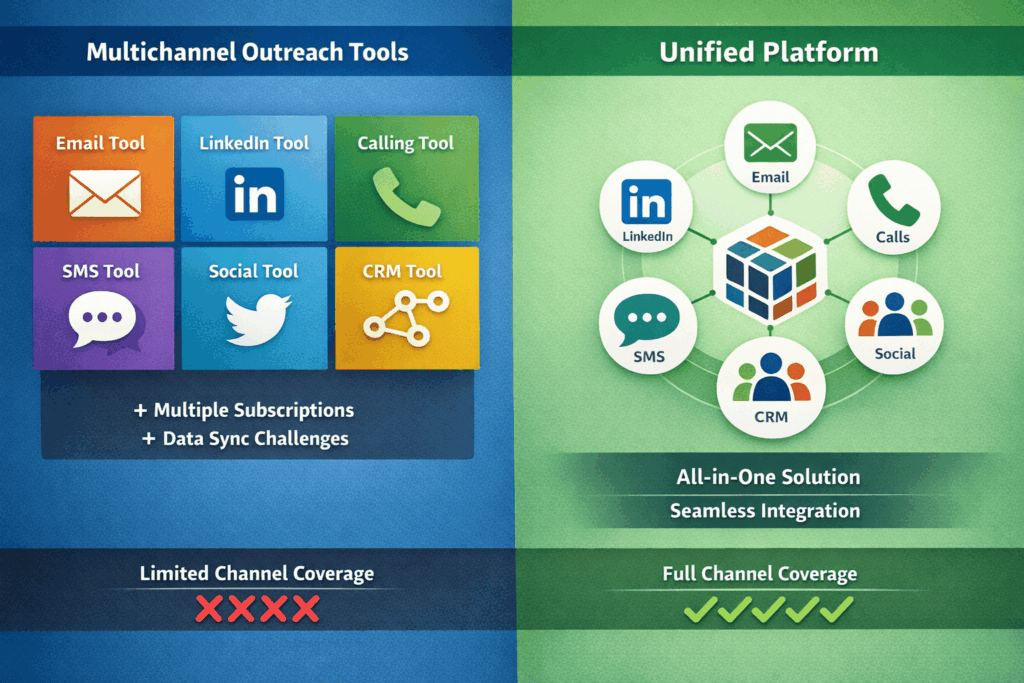
You need more leads and better conversations. Reply.io and BrandJet promise this. Let’s cut through the hype.
Reply.io is your volume engine. It blasts out emails, makes calls, and sends WhatsApp messages. Its huge database finds leads. You build a sequence, hit start, and it runs. It’s reliable, predictable automation.
BrandJet tries to be smarter. It uses the same channels—email, LinkedIn, social, WhatsApp. But it doesn’t just spray messages.
It looks for signals: who’s clicking, what they’re reading online. Its AI suggests when to change a message or pause a campaign. You see everything in one inbox, so you know what’s working now, not last week.
Here’s the breakdown:
| What it does | Reply.io | BrandJet |
| Channels | Email, Calls, WhatsApp | Email, LinkedIn, Social, WhatsApp |
| Finding Leads | Its own huge list | Outside data & live signals |
| How it works | Set it and forget it | Learns and suggests changes |
| Seeing results | Separate logs | One combined inbox |
Think about your main problem. If you just need to reach a ton of people on a schedule, Reply.io works. If your leads need different messages at different times, BrandJet’s AI might be worth it. It’s the difference between a factory line and a tailor.
Outreach.io Alternatives For Small Business
Look at a platform like Outreach.io. It’s packed with every feature a huge sales org could want. For a team of ten? It’s overkill.
The price is a serious burden, and the learning curve wastes weeks of time you don’t have.
Here’s how the choices stack up.
| What You Can Buy | What It Actually Means For You |
| The Big Enterprise Suite | You pay a premium for power you’ll probably never use. |
| A Bunch of Separate Apps | Each one works fine alone, but together they’re a fragmented mess. |
| One Combined Platform | Gets the essential jobs done from a single, simpler interface. |
The shift is happening toward the single platform.
The biggest drain isn’t the cost, it’s the friction. Logging into different systems for email, calls, and data entry breaks your focus and loses information.
An all-in-one system removes that daily hassle. Small teams adopt it because it solves the immediate problem: too much time spent on tools, not enough on customers. It’s a practical fix, not a flashy upgrade.
💡Pro Tip: If your team spends more time syncing tools than running campaigns, your stack is already too complex.
How To Choose The Right Cold Outreach Platform
Credits: Jordan Platten
Picking your sales software is really about picking how your sales cycle will work.
What Evaluators Actually Want
Teams shopping for a new tool are trying to fix problems. They want more replies from prospects. They need their emails to land reliably. They want to set up their outreach faster. And they need a practical plan to do it.
First, Decide Your Channel Mix
Start with the basics. Are you using just email, or are you adding other channels like SMS and social media?
Second, Scrutinize Deliverability
This is the most critical part. Look for specific features: inbox rotation, automated warmup, and domain protection. These stop your emails from hitting the spam folder.
Third, Look Past the “AI” Label
A lot of tools say they have AI. Check if their personalization and sequences actually go beyond simple stuff like filling in a name. It should feel more intelligent than a basic mail merge.
Fourth, See If It Fits Your Team
The software has to match your team’s size and how you work. Will your salespeople find it easy to use? Does it connect properly to your CRM for tracking deals?
| Your Situation | The Tool You Should Look For |
| You’re a solo founder. | Simple email automation. Low learning curve. |
| You run an agency. | A platform strong on deliverability and CRM sync, like Smartlead. |
| You’re on a growth team. | A multichannel tool with brand monitoring, like BrandJet. |
Where BrandJet AI Fits In Real Use Cases
Most software just shoots out messages. BrandJet is for the teams who need to know what happened before the “send” button.
Think about it. A mention pops up online. A news article quotes your CEO. A potential client asks a question in a forum.
Other tools see a task: send a message. BrandJet sees a story, and a chance to start a real conversation.
Here’s what that actually looks like:
1. Outreach That Starts with a Mention
You get an alert the second your brand is tagged on Reddit, LinkedIn, or in the press. Instead of taking notes for later, you can launch a tailored outreach sequence right then. The window for relevance is small; this closes it.
2. Sales Sequences That Think for Themselves
Forget sending the same three emails to everyone. Set up an AI SDR workflow that watches how people reply. If someone seems interested, the next message adjusts. If they’re negative, it can pivot or pause. The sequence has a brain.
3. One Place for Every Conversation
Your team’s inbox is probably a mess: emails here, DMs there, SMS somewhere else. BrandJet pulls every channel into a single, clean inbox and links each chat to the right contact. Finding history isn’t a scavenger hunt anymore.
| What You’re Used To | What BrandJet Does |
| Sending messages is the goal. | Understanding the context is the goal. |
| Finding opportunities is manual work. | Opportunities trigger outreach automatically. |
| Your inbox and your CRM don’t talk. | All conversations live with the contact’s profile. |
The point is to stop juggling six different apps. You see a signal, you act on it—all inside the same system. The process from spotting someone to speaking with them gets shorter, and a lot less complicated.
FAQ
How do cold email tools improve email deliverability and replies?
Cold email tools improve email deliverability by using email warmup, inbox rotation, and domain reputation tracking. They also include email verification to clean lists and reduce bounce rates.
With better deliverability features and a strong email deliverability stack, your messages land in the primary email inbox more often, which increases replies over time without sending more emails.
What should I look for in a cold email platform for lead generation?
Look for a cold email platform that supports lead generation with a built-in lead database, email automation tool, and strong CRM integrations. It should also include contact management, sequence builder, and campaign builder features.
A simple user interface and low Learning Curve help sales teams launch faster and manage the outreach process without needing multiple tools.
How does multichannel outreach compare to email-only outreach?
Multichannel outreach combines email outreach, LinkedIn automation, and social media touchpoints into one outreach process. This approach builds trust faster than email-only campaigns.
With multichannel sequences and LinkedIn integration, you reach prospects across platforms. This increases engagement, supports better outreach sequences, and improves overall results across the full sales cycle.
What automation features matter most in cold outreach software?
The most useful automation features include sequence automation, AI-powered sequences, and AI personalization. Tools with AI features like AI Writer or AI Sequence Copilot help create better email templates faster.
Merge tags still matter, but AI optimization improves relevance. A strong sequence builder also helps structure outreach sequences without making the process complex.
How do CRM integrations support cold outreach campaigns?
CRM integrations connect your cold outreach with CRM platforms to manage pipeline management and track the sales cycle. With CRM sync, you can update contact management data automatically and keep your outreach process organized.
This helps sales teams avoid manual work and ensures every interaction across email sequences and multichannel outreach stays consistent and easy to track.
Best Cold Outreach Platform
You’re dealing with tools that don’t sync, messages that miss, and results that feel off. It slows you down fast. You end up fixing gaps instead of closing deals. That’s the real problem. Fix this with outreach performance fixes.
If you want a simpler way to run outreach, try something built to connect it all. BrandJet helps you manage outreach without the mess, so you can focus on replies that matter. It’s a clean step forward.
References
- https://scholarworks.indianapolis.iu.edu/items/9fdfe602-1a83-4aba-abde-f0e3b284f82e
- https://capolicylab.org/news/email-and-robocall-nudges-helped-thousands-of-low-income-californians-claim-child-tax-credits-and-stimulus-payments/

More posts

How Effective Is Cold Email Outreach in 2026
How effective is cold email outreach in 2026? See real response rates, benchmarks, and simple ways to improve your...

Cold Email Outreach Response Rates 2026: What Works
What are cold email outreach response rates 2026? Learn real benchmarks, avoid spam filters, and improve reply rates...

Cold Email Vs Warm Email Outreach: Strategy Guide
Cold email vs warm email outreach: compare strategies, learn when to use each, and improve lead generation, response...